Kruskal's Algorithm — Algorithm Visualization & Coding Challenge
Choose Your Learning Path
How would you like to learn today?
Visualize algorithms in real time, explore them step by step, or challenge yourself with a test.Choose a path to focus—or scroll down to preview all options.
🧠 Active Learning
Visualize the algorithm step-by-step with interactive animations in real time.
📖 Passive Learning
Read the full explanation, examples, and starter code at your own pace.
🎯 Challenge Mode
Drag and arrange the algorithm steps in the correct execution order.
🧠 Select Active to activate
Watch algorithms run step by step.
Follow every state change, comparison, and transformation as the execution unfolds in real time.
📖 Select Passive to activate
Understanding Kruskal's Algorithm
Detailed explanation and reference materialsProblem Overview
Kruskal’s Algorithm (Minimum Spanning Tree)
Kruskal’s Algorithm is a greedy algorithm used to construct a Minimum Spanning Tree (MST) from a weighted, undirected graph. The goal of the MST is to connect all vertices with the minimum total edge weight, without forming any cycles.
How It Works
- Sort All Edges:
Begin by sorting all the edges in the graph in non-decreasing order by their weights. - Initialize MST:
Start with an empty set that will eventually become your MST. Each vertex is initially in its own separate tree. - Edge Selection:
Iterate over the sorted edges and, for each edge, check if including it in the MST would create a cycle.- Cycle Detection:
This is typically done using aUnion-Find(Disjoint Set Union) data structure.- If the two endpoints of the edge belong to different sets, the edge can be safely added to the MST, and the sets are merged.
- If the endpoints are in the same set, adding the edge would form a cycle, so it is skipped.
- Cycle Detection:
- Repeat Until Completion:
Continue adding edges until the MST contains exactly (V - 1) edges, where (V) is the number of vertices in the graph.
Example
Consider a graph with 5 vertices labeled A, B, C, D, and E and the following weighted edges:
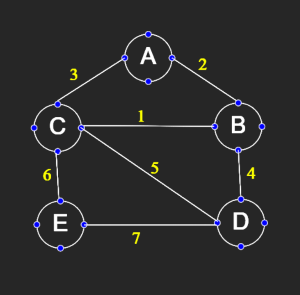
- Edge
(A, B)with weight 2 - Edge
(A, C)with weight 3 - Edge
(B, C)with weight 1 - Edge
(B, D)with weight 4 - Edge
(C, D)with weight 5 - Edge
(C, E)with weight 6 - Edge
(D, E)with weight 7
Step-by-Step Process:
- Sort the Edges:
Sorted by weight (lowest to highest):
[ {(B, C): 1,(A, B): 2,(A, C): 3,(B, D): 4,(C, D): 5,(C, E): 6,(D, E): 7 } ] - Initialize MST:
Start with an empty MST. Each vertex (A, B, C, D, E) is in its own component. - Process Each Edge:
- Edge
(B, C)(weight 1):
Vertices B and C are in different components. Include this edge. - Edge
(A, B)(weight 2):
Vertices A and B are in different components. Include this edge. - Edge
(A, C)(weight 3):
Now A, B, and C are already connected. Including (A, C) would form a cycle, so skip it. - Edge
(B, D)(weight 4):
Vertex D is not yet connected to the MST containing A, B, C. Include this edge. - Edge
(C, D)(weight 5):
Both C and D are already connected. Skip to avoid cycle. - Edge
(C, E)(weight 6):
Vertex E is not connected. Include this edge. - Edge
(D, E)(weight 7):
Both D and E are now connected in the MST; skip it.
- Edge
- MST Formed:
The MST consists of the edges:(B, C): 1(A, B): 2(B, D): 4(C, E): 6
Total Weight: (1 + 2 + 4 + 6 = 13)
Summary
Kruskal’s Algorithm constructs the Minimum Spanning Tree by:
- Sorting all edges by weight.
- Iteratively adding the smallest edge that does not form a cycle.
- Using a Union-Find structure to efficiently check for cycles.
This greedy approach guarantees that the final tree spans all vertices with the minimum possible total weight.
Complexity
- Time Complexity:
(Sorting the edges dominates; union-find operations are nearly constant time.)
- Space Complexity:
(Space is used to store the edge list and the union-find structure.)
— Written by Saurabh Patil • B.Tech CSE • Software DeveloperStarter Code
🎯 Select Challenge to activate
Think & Arrange, Don't Just Copy-Paste
Drag and arrange the algorithm steps in the correct execution order instead of spending time typing code letter by letter.
Arrange the Algorithm Correctly 🧩
The algorithm is divided into three logical parts. Carefully rearrange each section in the correct order to form a complete and valid solution.
Understand Below AlgorithmOR
Don't Know Current Algorithm ?
Green text means the instruction is placed in the correct position.
Red text means the instruction is in the wrong position.
Instructions with the same background color indicate particular blocks start and end.
A tick mark means the instruction is correct and locked.
🔒 Locked steps cannot be moved. Only unlocked steps are draggable.
🔊 Enable sound for swap feedback and completion effects.