Minimum Cost to Make a Valid Path in a Grid — Algorithm Visualization & Coding Challenge
Choose Your Learning Path
How would you like to learn today?
Visualize algorithms in real time, explore them step by step, or challenge yourself with a test.Choose a path to focus—or scroll down to preview all options.
🧠 Active Learning
Visualize the algorithm step-by-step with interactive animations in real time.
📖 Passive Learning
Read the full explanation, examples, and starter code at your own pace.
🎯 Challenge Mode
Drag and arrange the algorithm steps in the correct execution order.
🧠 Select Active to activate
Watch algorithms run step by step.
Follow every state change, comparison, and transformation as the execution unfolds in real time.
📖 Select Passive to activate
Understanding Minimum Cost to Make a Valid Path in a Grid
Detailed explanation and reference materialsProblem Overview
Problem Summary: Minimum Cost to Make a Valid Path in a Grid
You are given a grid with m x n dimensions, where each cell contains an arrow pointing to one of four directions:
- Right (1): Move to the cell on the right.
- Left (2): Move to the cell on the left.
- Down (3): Move to the cell below.
- Up (4): Move to the cell above.
- You start at the top-left corner
(0, 0)and aim to reach the bottom-right corner(m-1, n-1)by following the arrows. - If necessary, you can modify the arrow in a cell at a cost of
1. - The goal is to calculate the minimum cost required to create at least one valid path from the start to the end of the grid.
Examples:
-
Input:
[[1,1,1,1],[2,2,2,2],[1,1,1,1],[2,2,2,2]]
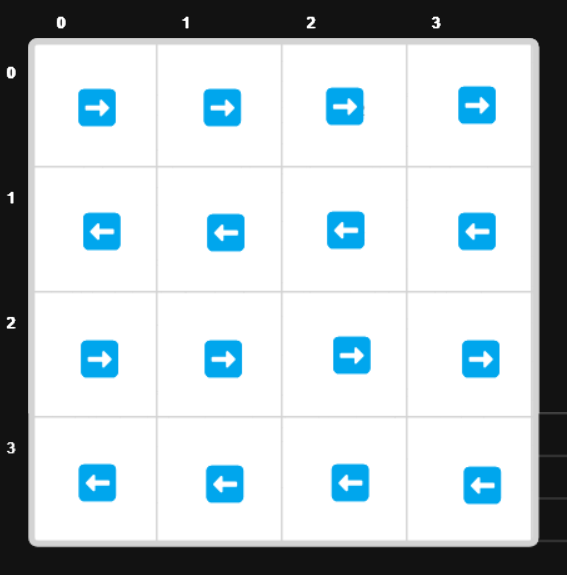
Output:
3Explanation: Modify arrows in 3 cells to create a valid path from
(0, 0)to(3, 3). -
Input:
[[1,1,3],[3,2,2],[1,1,4]]Output:
0
Explanation: A valid path already exists without any modifications. -
Input:
[[1,2],[4,3]]
Output:1
Explanation: Modify one cell's arrow to create a valid path.
Constraints:
1 <= m, n <= 100- Each cell contains a value from
1to4.
Starter Code
🎯 Select Challenge to activate
Think & Arrange, Don't Just Copy-Paste
Drag and arrange the algorithm steps in the correct execution order instead of spending time typing code letter by letter.
Arrange the Algorithm Correctly 🧩
The algorithm is divided into three logical parts. Carefully rearrange each section in the correct order to form a complete and valid solution.
Understand Below AlgorithmOR
Don't Know Current Algorithm ?
Green text means the instruction is placed in the correct position.
Red text means the instruction is in the wrong position.
Instructions with the same background color indicate particular blocks start and end.
A tick mark means the instruction is correct and locked.
🔒 Locked steps cannot be moved. Only unlocked steps are draggable.
🔊 Enable sound for swap feedback and completion effects.